GATE 01
Account blocklist
Refuses to arm on any account whose name matches your blocked list. Funded accounts that prohibit news trading stay out of reach by configuration, not by memory.
Execution strategy · NinjaTrader 8
In the strategy, set up in advance
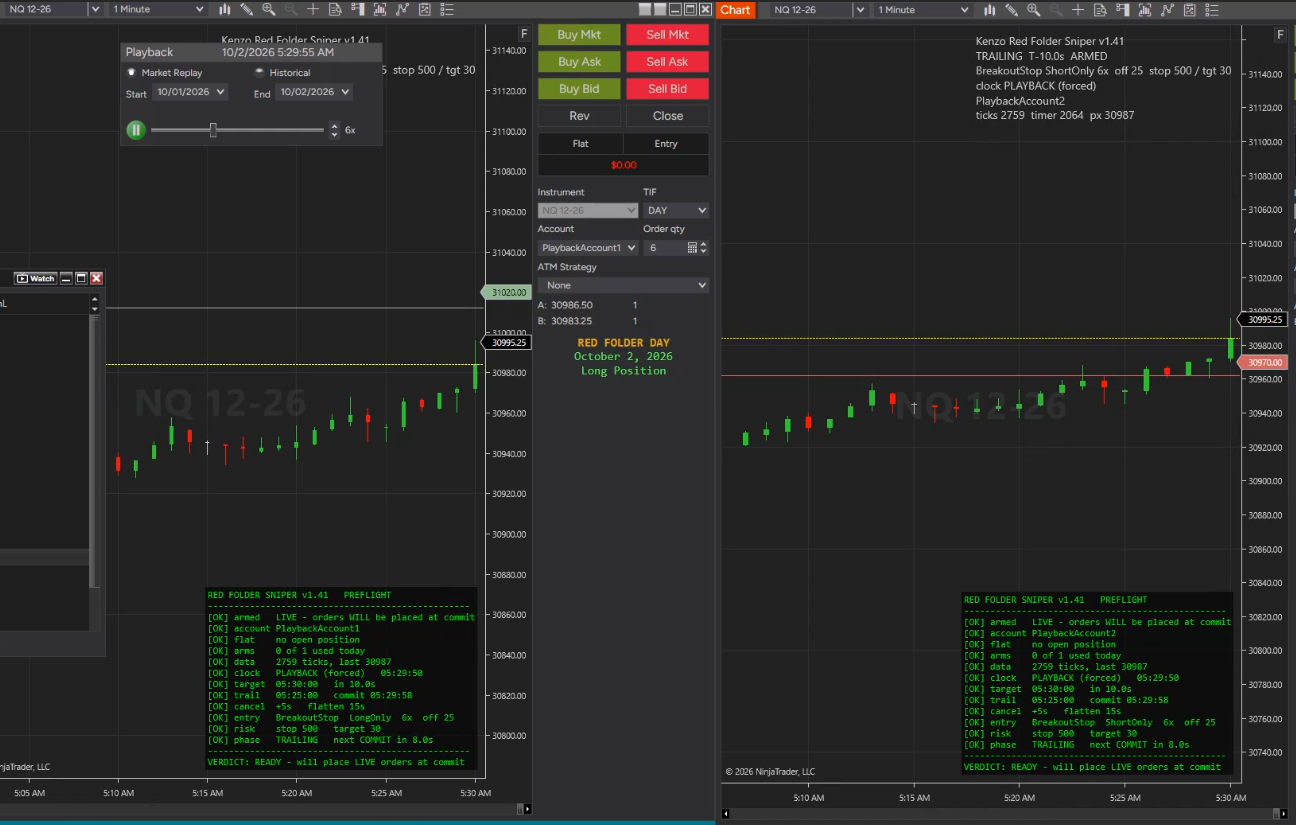
Verify it all with pre-flight, on the chart.
Then sit back and watch the sniper trade.
Red Folder Sniper trails a bracket around price, freezes it seconds before a high-impact release, and leaves a live OCO entry pair in the book for the spike. Whatever does not fill is pulled a few seconds later.
The sequence
A 25ms timer drives the schedule rather than tick arrival, so the strategy acts on time even when the book goes quiet ahead of the release.
| Moment | Default | What happens |
|---|---|---|
| Trail | T−120s | A phantom bracket appears and follows price at your offset. Nothing is live yet. |
| Commit | T−5s | Prices freeze and a live OCO entry pair goes to the book. The acknowledgement latency is logged, so you know how much margin you had. |
| Release | T | Whichever leg the spike reaches fills. The other is cancelled by the OCO. |
| Bracket | on fill | One stop and target pair, sized from the filled position and priced off the average fill — not one pair per partial. |
| Cancel | T+15s | Unfilled entries are pulled, then re-checked, because a cancel request is not a cancel confirmation. |
The calendar
Non-Farm Payrolls and CPI, every one at 08:30 ET. These are typed from the BLS schedule rather than worked out, because neither can be: NFP is usually the first Friday, but a holiday near the start of the month moves it — 2 July 2026 fell on a Thursday. CPI follows no rule at all, landing anywhere between the 10th and the 14th, on any weekday.
| Date | Day | Release | NQ front month |
|---|---|---|---|
| Loading the schedule… | |||
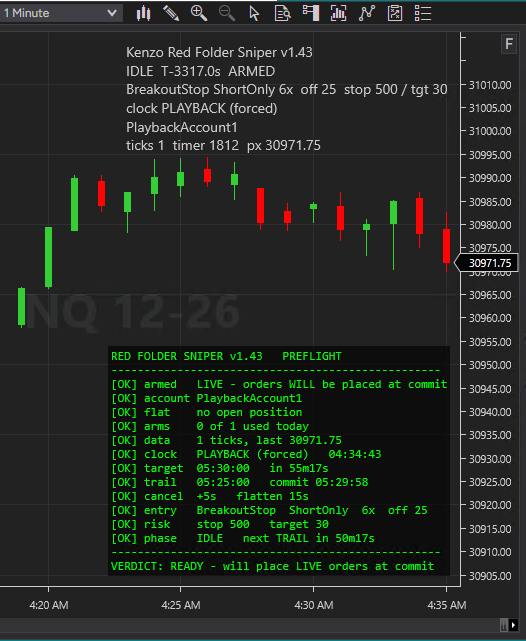
Before it arms
Every gate that can stop an entry, listed with a pass or fail mark, in the same order the strategy checks them, ending in one verdict line.
GATE 01
Refuses to arm on any account whose name matches your blocked list. Funded accounts that prohibit news trading stay out of reach by configuration, not by memory.
GATE 02
Will not arm unless the whole account is flat, not just this strategy. A position left by another instance or a manual trade stops it.
GATE 03
Ships with live orders switched off. It draws, logs and measures the tape without submitting anything until you turn it on deliberately.
Afterwards
Every line goes to the Output window and to a dated log file, so a run can be read back later instead of remembered. Each finished trade is also appended to a CSV.
Entry and exit times from the executions, the spike, the resting order, the actual fill, the exit and its reason, points and cash, plus maximum adverse and favourable excursion.
NinjaTrader deletes a script's drawings when it stops. The companion Trade Markers indicator reads the CSV and redraws them, so a finished trade stays on the chart.
Hypothetical. This is Market Replay on simulated accounts, not a live result, and a profit figure is visible on screen. Hypothetical performance results have many inherent limitations, are prepared with the benefit of hindsight, and involve no financial risk. No representation is made that any account will achieve similar profits or losses. Full disclosure →
Settings
Everything is a property in the normal NinjaTrader dialog. Nothing is hard-coded and nothing needs the source opening.
Arm live orders — off by default. While it is off the strategy draws, logs and measures the tape without submitting anything.
Block accounts containing — a comma-separated list. The strategy refuses to arm on any account whose name contains one of these, which is how a funded account stays out of reach.
Require account contains — the inverse, when you want it locked to one account.
Release hour, minute and second, on the chart's own clock; how long before the release to start trailing and to commit; how long after to cancel unfilled entries and to flatten. Plus a clock source toggle for replay.
The clock source matters: set it to Playback on a replay chart, or the schedule is compared against today's time while the bars replay a past session.
Breakout stop or reversion limit; long only, short only or both; contracts; and the offset in points from last price at which each leg rests.
The offset is the number that decides everything. Too tight and the pre-release wobble fills you; too wide and the release never reaches you. The strategy logs how close price came to each leg so you can size it from data.
Stop and target in points, applied to the average fill. With a flatten timer set, the stop is a backstop rather than the usual exit.
Whether to draw finished trades, whether they are global to the instrument, whether to export them, where to export them, and the colours, widths and label placement for the spike, order, fill and exit levels.
Diagnostic logging, the heartbeat interval, and whether to mirror every line to a dated file. Leave all three on: the output is a few lines a minute, and it is the difference between knowing why nothing happened and guessing.
Whether to show the panel, which corner it sits in, and its font size.
Hypothetical performance disclosure. Any example, screenshot, replay or simulated result shown for this product is hypothetical. Hypothetical performance results have many inherent limitations. No representation is being made that any account will or is likely to achieve profits or losses similar to those shown. There are frequently sharp differences between hypothetical performance results and the actual results subsequently achieved by any particular trading program. One of the limitations of hypothetical performance results is that they are generally prepared with the benefit of hindsight. In addition, hypothetical trading does not involve financial risk, and no hypothetical trading record can completely account for the impact of financial risk in actual trading. Futures trading carries substantial risk of loss and is not suitable for every investor.